MaxAI Revenue Execution Agent: Prompt Library

The MaxAI Revenue Execution agent helps sellers and sales managers consistently execute deals by turning Altify and Salesforce data into AI-powered actionable strategy and guidance. You can also populate Altify with suggested actions, missing key players and other information that is uncovered by the agent, and easily access the latest Opportunity Manager and Salesforce data without leaving your current screen.

Note: The following are required for you to access the MaxAI Revenue Execution agent:

  • Agentforce and the Altify MaxAI extension package are installed in your org.
  • The MaxAI Revenue Execution agent is configured and activated by your administrator.
  • You have the relevant Agentforce and MaxAI permissions.

This topic covers the following:

Access the agent

  1. Click the Agentforce icon .

    The Agentforce conversation panel is displayed.

  2. If you have access to more than one agent, you may need to select MaxAI Revenue Execution in the drop-down menu - as shown in the example below.
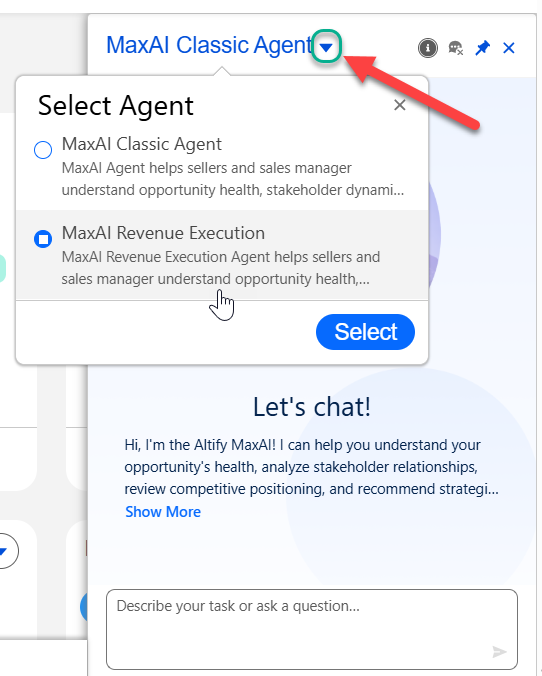
    With the MaxAI Revenue Execution agent selected, you can begin querying the agent for opportunity strategy and guidance.

Strategic prompt library for sellers

The following are suggested prompts to get you started (as a seller) with the MaxAI Revenue Execution agent.

Note: Currently, if you are in Altify you will need to specify the opportunity that is the subject of your query. We recommend that you put the opportunity name in quotation marks if you are calling it out (e.g. 'What weaknesses do we have in the opportunity "Ancaster Engineering - 500 seats"?'). If you are on the opportunity in Salesforce, the agent will automatically understand the context.

Use Case Strategic Prompt Suggestions for Sellers
Opportunity Vulnerability Analysis
  • What weaknesses do we have in this opportunity?
  • Are there any risks that could cause us to lose this opportunity?
  • Where are we most vulnerable in this opportunity right now?
Opportunity Risk Analysis
  • What are the biggest risks in this opportunity?
  • Is anything blocking this opportunity from progressing?
  • What could prevent this opportunity from closing?
Next Best Actions
  • What should I do next to move this opportunity forward?
  • What actions would improve my chances of winning this opportunity?
  • What are the next best steps for this opportunity?
Stakeholder Landscape Analysis
  • Who are the key stakeholders in this opportunity?
  • Are we missing any decision makers or influencers?
  • Who supports us and who might block this opportunity?
Assessment Analysis
  • What does the assessment say about this opportunity?
  • Where is this opportunity strong and where are the gaps?
  • What should I improve before moving to the next stage?
Strategic Questions Analysis
  • What questions should I ask in my next customer meeting?
  • What discovery questions will help me understand the customer better?
  • What should I ask to uncover the customer’s priorities?
Call Plan Generation
  • Help me prepare for my meeting with this customer.
  • What should my agenda be for the upcoming call?
  • How should I structure my next meeting with this contact?
Actions Commentary
  • Why are these recommended actions important for this opportunity?
  • Explain why these steps will improve our chances of winning.
  • Why should I focus on these next actions?
Find Missing Contacts
  • Are we missing any important contacts in this opportunity?
  • Who else should I engage to improve coverage on this opportunity?
  • Which stakeholders are missing from this opportunity?
Opportunity Review
  • Help me prepare for my opportunity review.
  • What should I be ready to discuss in my opportunity review with my manager?
  • Summarize the key points and risks I should cover in my opportunity review.

Strategic prompt library for sales managers

The following are suggested prompts to get you started (as a sales manager) with the MaxAI Revenue Execution agent.

Note: Currently, if you are in Altify you will need to specify the opportunity that is the subject of your query. We recommend that you put the opportunity name in quotation marks if you are calling it out (e.g. 'What weaknesses do we have in the opportunity "Ancaster Engineering - 500 seats"?'). If you are on the opportunity in Salesforce, the agent will automatically understand the context.

Use Case Strategic Prompt Suggestions for Sales Managers
Pipeline Risk Analysis
  • Which opportunities in my pipeline are at risk?
  • What opportunities might slip this quarter?
  • Which opportunities need attention right now?
Opportunity Inspection Support
  • I’m reviewing this opportunity with the rep—what issues should I focus on?
  • What should I challenge the seller on in this opportunity?
  • What weaknesses should I look for in this opportunity review?
Opportunity Health Summary
  • Give me a quick health summary of this opportunity.
  • How healthy is this opportunity right now?
  • What’s the overall status of this opportunity?
Coaching Recommendations
  • How should I coach the seller on this opportunity?
  • What guidance should I give the rep to improve this opportunity?
  • What coaching would help move this opportunity forward?
Pipeline Coverage Insights
  • Show me seller X’s opportunities from Jan to June 2026.
  • Do we have enough pipeline coverage this quarter?
  • Where are the biggest gaps in my team’s pipeline?
Executive Opportunity Review Coaching
  • Help me prepare for an executive opportunity review.
  • What risks or gaps should I address before presenting this opportunity to leadership?
  • Summarize this opportunity so I can brief executives on the status and likelihood to close.

Create/update prompt library

The following are suggested prompts to create or update data in Opportunity Manager with the MaxAI Revenue Execution agent.

Note: Currently, if you are in Altify you will need to specify the opportunity that is the subject of your query. We recommend that you put the opportunity name in quotation marks if you are calling it out (e.g. 'What weaknesses do we have in the opportunity "Ancaster Engineering - 500 seats"?'). If you are on the opportunity in Salesforce, the agent will automatically understand the context.

Use Case Create/Update Prompt Suggestions
PRIME Actions
  • Create 3 high-priority actions for this opportunity.

  • Change the Due Date for the action [action name] to 30/12/26

  • Assign ownership of the action [action name] to [user name].

Assessment answers
  • Set the assessment question 'Unique Business Value' to 'Yes' for the competitor [competitor name]

  • Set the assessment question 'Insight Support' to 'Yes' for my organization.

  • Add the following to the 'Unique Business Value' assessment question notes: [assessment question notes]

Decision Criteria
  • Create an informal decision criterion: 'Potential participation in CAB'.

  • Make the formal decision criterion '24/7 Support' mandatory.

  • Associate the contact [contact name] with the formal decision criterion 'Proven whitespacing capability'.

Relationship Map
  • Add the contact [contact name] to the opportunity relationship map.

  • Set [contact name]'s Support to 'Neutral'.

  • Add a line of conflict between [contact name] and [contact name].

Insights
  • Create a Goal insight: 'Reduce infrastructure costs by 30%'

    (Note that all insights created via the MaxAI Revenue Execution agent are automatically added to a section entitled 'MaxAI').

  • Link [contact name] with the Goal insight 'Reduce infrastructure costs by 30%'

  • Set [contact name] as the contact who told me about the Obstacle insight 'Difficult for account team to collaborate'

'Show me' prompt library

The following are suggested prompts to view Altify data via the MaxAI Revenue Execution agent.

Note: Currently, if you are in Altify you will need to specify the opportunity that is the subject of your query. We recommend that you put the opportunity name in quotation marks if you are calling it out (e.g. 'What weaknesses do we have in the opportunity "Ancaster Engineering - 500 seats"?'). If you are on the opportunity in Salesforce, the agent will automatically understand the context.

Use Case 'Show Me' Prompt Suggestions
Insight Map data
  • What are the insights for this opportunity?

  • What goals and pressures have been captured?

Relationship Map data
  • Who are the stakeholders?

  • Show me the key players where we are lacking support

Assessment data
  • What are the assessment decision criteria?

  • Who are our main competitors for this opportunity?

Action data
  • Show me the PRIME actions for this opportunity.

  • What PRIME actions are overdue for this opportunity?