What's New
Note: Full release information is available in the Summer '25 (9.16) Release Notes.
Described below are the key changes delivered with this release:
MaxAI
Accessing AI guidance in the Altify interface
Access AI guidance on an account or opportunity insight map with the click of a button (Generate with MaxAI) to generate a section of suggested insights - as shown in the example below.
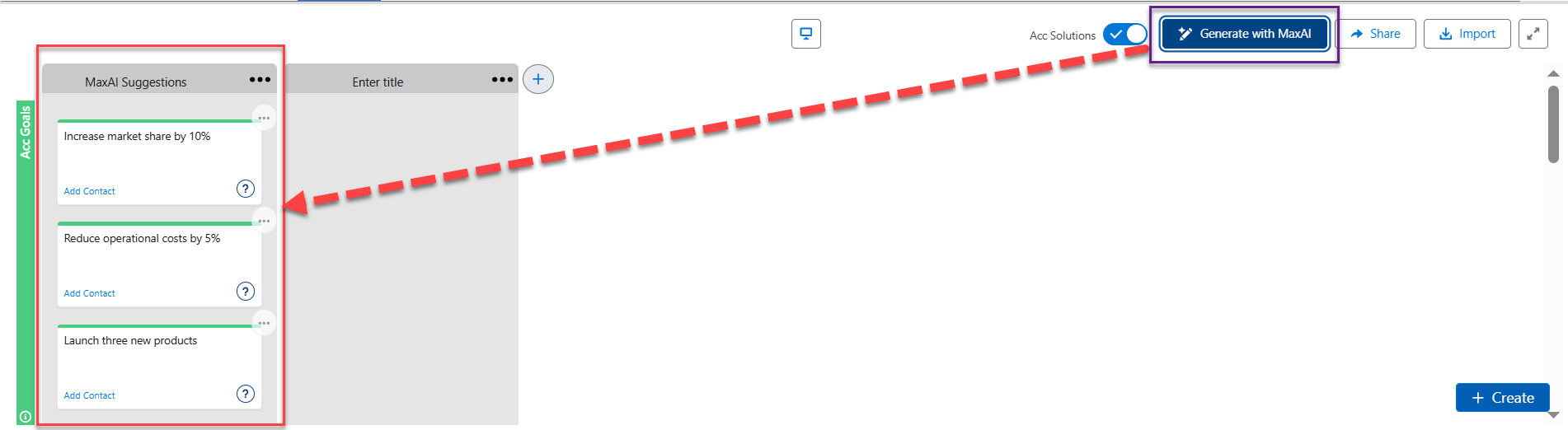
For more information, see Using MaxAI to Populate an Insight Map.
MaxAI access in the Altify interface needs to be configured by an administrator. For more information, see Enabling MaxAI in Altify.
Relationship Maps
Support for the Account Contact Relationship object
Altify offers limited support if your organization uses the standard Account Contact Relationship object.
The account contact relationship object is a junction object that allows you to associate a single contact with multiple accounts (a direct relationship with their primary account and an indirect relationship with other accounts). For more information, see Contacts to Multiple Accounts in the Salesforce Help.
Altify relationship maps supports these relationships as follows:
-
When adding contacts to a map, contacts indirectly associated with the account are available for selection in the list of contacts suggested by Altify.
-
Adding or creating a contact on a relationship map will create an Account Contact Relationship record connecting the contact with the relevant account.
-
The Account Contact Relationship record will capture whether this is a direct or indirect relationship (indirect if the contact belongs to a different account than the one associated with the relationship map).
For more information, see Supporting Account Contact Relationships .